GPS Tracking for Security Guards: Everything You Need to Know
Sun, Apr 5, 2026
Read in 8 minutes
Complete guide to GPS tracking for security guards. How it works, key features, legal considerations, benefits for security companies, and how to choose the right system.
Every security company owner has faced this question at some point: “How do I know my guards are actually where they are supposed to be?”
Phone calls work when you have 5 guards. At 20 guards across multiple sites, calling each one is not realistic. At 50 or 100 guards, it is impossible. GPS tracking solves this problem by giving you real-time visibility into every guard’s location without a single phone call.
This guide explains how GPS tracking works for security operations, what features to look for, the legal rules you need to follow in the US and Canada, and how to choose the right system for your company.
What Is GPS Tracking for Security Guards?
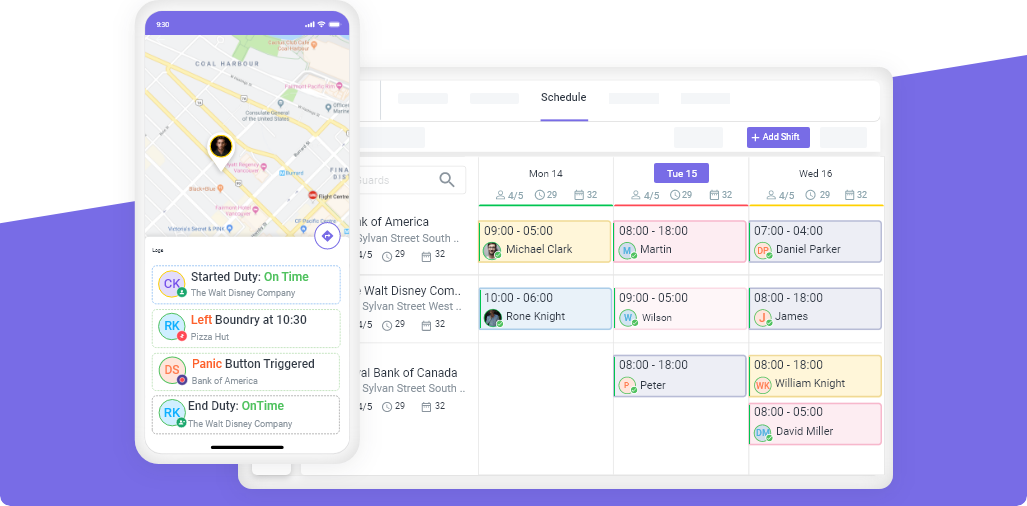
GPS tracking for security guards uses the Global Positioning System built into smartphones to monitor guard locations in real time. When a guard carries a phone with a security management app installed, the app periodically sends location data to a central dashboard that managers can view.
This is not a concept borrowed from fleet tracking or delivery logistics. Security-specific GPS tracking is designed around the unique needs of guard operations: verifying site presence, monitoring patrol routes, confirming checkpoint visits, and providing proof of service to clients.
The technology works through three components:
- Guard’s mobile device with the security app installed, which captures GPS coordinates
- Cloud platform that receives, stores, and processes location data
- Manager dashboard that displays real-time maps, patrol history, and alerts
Most modern systems update location data every 30-60 seconds during active shifts, providing near-real-time visibility without excessive battery drain.
How GPS Tracking Works in Security Operations
In practice, GPS tracking integrates into the daily workflow of both guards and managers.
For guards:
- Clock in through the mobile app when arriving at a site. The app records the GPS location automatically.
- Complete patrol routes. The app tracks the path walked or driven.
- Scan checkpoints (NFC tags or QR codes) at designated patrol points. Each scan is GPS-stamped.
- Clock out at shift end. The app stops tracking.
For managers:
- Open the live map dashboard to see all guards currently on duty
- Click any guard to see their current location, shift details, and patrol progress
- Receive alerts if a guard has not clocked in by shift start time
- Review patrol history for any shift after it ends
- Generate client reports showing patrol coverage with timestamps and routes
A security company in Vancouver, for example, uses GPS patrol data to show their commercial property clients exactly which areas were patrolled and when. Before GPS tracking, clients had to trust that patrols happened. Now they can see the evidence in their weekly reports.
Key Features to Look For in a GPS Tracking System
Not all GPS tracking systems are designed for security operations. A delivery fleet tracker will not meet your needs. Look for these security-specific features:
| Feature | What It Does | Why It Matters |
|---|---|---|
| Real-time location map | Shows all guards on a live map | Instant visibility across all sites |
| Geofenced clock-in/out | Guards can only clock in within a set radius of the site | Prevents buddy punching and off-site clock-ins |
| Patrol route history | Records the path a guard walked or drove during their shift | Proof of patrol for clients and audits |
| Checkpoint scanning | NFC or QR code scanning at patrol points, GPS-stamped | Verifies guards visited specific locations |
| Missed clock-in alerts | Notifies managers when a guard has not clocked in on time | Catch no-shows immediately, not hours later |
| Battery optimization | Intelligent polling intervals that balance accuracy and battery | Guards can work full shifts without charging |
| Offline mode | Continues tracking even if the phone loses internet briefly | No gaps in patrol data in areas with poor signal |
| Client portal integration | Share GPS data directly with clients | Builds trust and justifies contract pricing |
Novagems includes all of these features in a single platform, alongside scheduling, incident reporting, and payroll timesheets.
Benefits of GPS Tracking for Security Companies
1. Accountability Without Micromanagement
GPS tracking does not mean watching every guard every minute. It means having the data available when you need it. If a client questions whether a patrol happened, you can show them. If a guard claims they were on site, you can verify it.
The best security companies use GPS data as a trust-building tool, not a surveillance weapon. Guards who are doing their job have nothing to worry about. Guards who are not will be identified quickly.
2. Faster Response to No-Shows and Late Arrivals
Without GPS tracking, you typically learn about a no-show when the client calls. With GPS-verified clock-in alerts, you know within minutes of shift start. This turns a 2-3 hour response into a 15-30 minute response.
3. Professional Client Reports
Clients are paying for security coverage. They want evidence that they are getting what they paid for. GPS patrol data, checkpoint completions, and incident reports packaged into a professional report give clients confidence that their investment is working.
4. Reduced Overtime and Payroll Disputes
GPS-stamped clock-in and clock-out times create accurate, indisputable timesheets. Guards cannot claim they worked hours they did not. Start and end times are recorded automatically. This reduces payroll disputes and ensures you only pay for actual hours worked.
5. Evidence for Incidents and Liability
When an incident occurs at a client site, one of the first questions is: “Where was the guard?” GPS data provides a definitive answer. This protects both the guard (if they were doing their job) and the company (if there is a liability question).
GPS Tracking vs Geofencing: What’s the Difference?
These terms are often used interchangeably, but they serve different purposes:
| GPS Tracking | Geofencing | |
|---|---|---|
| What it does | Continuously tracks location | Creates a virtual boundary |
| When it activates | Throughout the entire shift | When a guard enters or leaves a defined area |
| Data type | Continuous path/route | Entry/exit events |
| Primary use | Patrol monitoring, route verification | Clock-in verification, site presence |
| Battery impact | Moderate (continuous polling) | Low (event-based only) |
| Best for | Mobile patrol, multi-point routes | Static posts, clock-in/out verification |
Most security companies need both. Use geofencing for clock-in verification (guard must be within 100 meters of the site to clock in) and GPS tracking for patrol monitoring (verifying the guard walked the route).
Legal Considerations for GPS Tracking Guards (US & Canada)
GPS tracking employees is legal in both countries, but there are rules to follow.
United States:
- Employers can track employees during work hours on company-provided devices without explicit consent in most states
- California, Connecticut, and a few other states require notifying employees that monitoring is in place
- Off-duty tracking is generally prohibited
- Include GPS tracking in your employee handbook and have guards acknowledge it during onboarding
Canada:
- Federal PIPEDA and provincial privacy laws require informing employees about tracking
- Tracking must be reasonable and proportionate to the business need (security operations clearly qualify)
- Guards must be informed of what data is collected, how it is used, and who can access it
- Off-duty tracking is prohibited
Best practice for both countries: Be transparent. Tell guards during onboarding that GPS tracking is active during shifts. Explain why (client accountability, safety, accurate timesheets). Guards who understand the purpose are far more likely to accept it.
How GPS Tracking Improves Client Reporting
Client reports are where GPS tracking delivers its most visible business value. Instead of a text summary that says “all patrols completed,” you can show:
- Patrol routes on a map with timestamps showing when each area was covered
- Checkpoint completion records proving specific locations were visited
- Clock-in and clock-out times confirming full shift coverage
- Incident locations pinpointed on the property map
- Response times showing how quickly guards addressed alerts
A security company in Toronto won a $12,000/month contract specifically because their proposal included sample GPS patrol reports. The client’s previous provider could only offer text-based daily logs. The visual proof of patrol coverage made the decision easy.
Common Concerns Guards Have About GPS Tracking (And How to Address Them)
“I feel like I’m being watched constantly.”
Address it: Explain that GPS data is reviewed for client reporting and accountability, not to monitor bathroom breaks. Most managers only check GPS data when there is a specific reason (client complaint, incident review, no-show investigation).
“Will it track me when I’m off duty?”
Address it: Modern security apps only track during active shifts. When a guard clocks out, tracking stops. Demonstrate this during onboarding by showing them the app’s behavior after clock-out.
“It drains my phone battery.”
Address it: Modern apps use 5-10% additional battery over an 8-hour shift. Suggest guards start their shift with a full charge. Some companies provide portable battery packs for overnight shifts.
“I don’t want my personal phone tracked.”
Address it: If using personal devices (BYOD), ensure the app only accesses location during active shifts. Some companies provide dedicated work phones for guards who are uncomfortable using personal devices.
Choosing the Right GPS Tracking System for Your Company
When evaluating GPS tracking systems, prioritize these factors:
Security-specific design. General employee tracking tools lack checkpoint tours, incident reporting, and client portals. Choose a platform built for security operations.
Mobile app quality. Guards use the app every shift. It needs to be reliable, fast, and easy to use. Test it on both Android and iOS before committing.
Battery efficiency. A tracking app that kills the phone battery by mid-shift is useless. Ask about polling intervals and battery optimization.
Integration with scheduling and reporting. GPS tracking is most valuable when it connects to your scheduling, timesheets, and client reporting in one platform. Separate tools create data silos.
Offline capability. Guards sometimes work in areas with poor cell coverage (underground parking, remote sites). The app should continue tracking and sync data when connectivity returns.
Scalability. A system that works for 20 guards should also work for 200. Ask about per-user pricing and whether features change at different scales.
Novagems combines GPS tracking, geofencing, checkpoint tours, scheduling, and client reporting in one platform. Start a free 14-day trial to test it with your team.
Sign up For Newsletter
Latest Blog Posts


Get Started
Start being productive & grow your business
with Novagems