It’s 11:47 PM. Your phone rings. A client is calling — one of your biggest accounts. A guard didn’t show up for the overnight shift two hours ago, and no one told you. The client found out before you did.
That call costs you more than just sleep. It costs you trust.
If you’re managing security guards with spreadsheets, group texts, and phone calls, you already know: the system breaks at the worst possible moments. Security guard management software exists to make sure it doesn’t.
This guide covers exactly what security guard management software does, the 10 features every security company needs, how to choose the right platform, what it costs, and how the top options compare. Whether you’re running 10 guards or 200, you’ll know what to look for — and what to avoid.
What Is Security Guard Management Software?
Security guard management software is a digital platform that helps security companies schedule guards, track their locations in real time, manage patrol routes and checkpoints, record incidents, process timesheets, and communicate with both field staff and clients — all from a single system.
That definition covers the core. But what makes security guard software different from generic workforce tools like Slack or Google Calendar?
Generic tools are built for office workers. They don’t know what a post order is. They can’t verify that a guard completed a checkpoint tour at 3 AM. They have no concept of NFC tags, GPS geofencing, or patrol route compliance.
Security guard management software is built for the specific operational realities of field security work — 24/7 shifts, multi-site deployments, incident reporting, and client accountability. It connects your back office to every guard in the field, in real time, without phone calls.
It’s used by private security companies of all sizes, from 5-guard operations up to 500-guard enterprises. The right platform scales with your business and replaces the patchwork of spreadsheets, messaging apps, and paper timesheets that most companies are still relying on today.
Why Security Companies Need Dedicated Software
Running a security operation without the right tools is like navigating without GPS — you’ll get somewhere, but you’ll waste time, miss turns, and arrive late when it matters most.
Here’s what manual management actually costs:
Scheduling alone consumes 20+ hours per week for companies running multiple sites and rotating shifts. Creating a schedule, filling gaps, handling call-outs, notifying guards — none of it is automatic without software. That’s half a full-time job just moving names around a spreadsheet.
Coverage gaps happen without warning. A guard calls out sick. You don’t know until the client calls. By then, you’ve already lost the trust that took months to build. Without real-time visibility, you’re always reacting — never preventing.
Paper timesheets are expensive and unreliable. Guards round up their hours. Supervisors lose sheets. Payroll takes days to reconcile. Timesheet inaccuracies can add up to 4–8% of total payroll — a significant leak in a margin-sensitive business.
Clients have no visibility. When a client asks “was my site patrolled last night?", the best many security companies can offer is a guard’s word. That’s not enough to retain high-value contracts or win new ones.
The security guard management software market reflects how urgent this problem is. Valued at $2.21 billion in 2025, the market is projected to reach $4.33 billion by 2030 — a 14.4% annual growth rate. Security companies are moving this direction. The question is whether you move early or get left behind.
10 Must-Have Features in Security Guard Management Software
Not all platforms are equal. When evaluating security guard management software, these are the 10 features that separate effective systems from overpriced tools.
1. Real-Time GPS Tracking
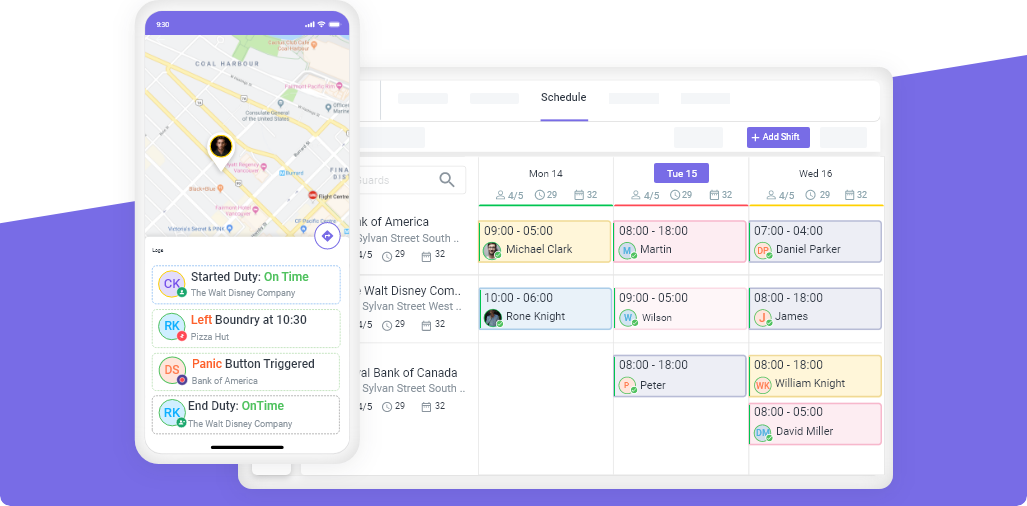
You should know exactly where every guard is, right now — not where they were 30 minutes ago. Real-time GPS tracking for security guards lets you see all active personnel on a live map, verify they’re on-site, and respond instantly when someone is out of position. This is the foundation of real operational visibility.
2. Guard Tour and Checkpoint System
A guard tour system uses NFC tags or QR codes placed at specific checkpoints around a client’s site. Guards scan each checkpoint during patrol, creating a timestamped record that proves the area was covered. When a client asks “was that area patrolled at 2 AM?", you have a precise, verifiable answer. See how a guard tour system works and why clients increasingly expect it.
3. Automated Scheduling
Manual scheduling is the single largest time drain for most security operations managers. Automated scheduling lets you build recurring shift templates, set rules for certifications and qualifications, and fill gaps with qualified guards automatically. Guards receive their schedule on their phone. No calls, no confusion.
4. GPS Geofencing for Automatic Clock-In/Out
GPS geofencing creates a virtual boundary around each client site. When a guard enters the boundary, they’re automatically clocked in. When they leave, they’re clocked out. This eliminates timesheet fraud, buddy punching, and the administrative burden of manually reviewing attendance every day.
5. Mobile Incident Reporting with Photos
When something happens on a client site, guards need to report it immediately — not at the end of the shift when details have faded. Mobile incident reporting lets guards log incidents from their phone in real time, attach photos, add GPS coordinates, and categorize the event. You have a complete, timestamped record before the shift ends.
6. Digital Timesheets and Payroll Export
Every hour a guard works should flow directly from the platform into payroll — without manual entry. Digital timesheets that sync with your security guard scheduling software eliminate the reconciliation step that consumes hours every pay period. Look for platforms that export to standard payroll formats or integrate with tools like QuickBooks.
7. In-App Team Communication
When you need to reach all guards immediately — emergency coverage change, weather warning, updated post orders — you need a communication channel that doesn’t get lost in personal text threads. In-app messaging keeps all guard communication in one place, on the record, and accessible to managers.
8. Client Portal and Automated Reporting
Your clients want to know their sites are protected. A client portal gives them on-demand access to patrol logs, incident reports, and coverage data — without calling you. Automated reports sent weekly or after each shift keep clients informed and reduce the service calls that interrupt your day.
9. Real-Time Operations Dashboard
A central dashboard that shows all active sites, live guard locations, open incidents, and upcoming shift start times is the control center your operation needs. Instead of checking in with supervisors by phone, you see everything at a glance — and act before problems escalate.
10. Task Management and Post Orders
Every guard at every site has specific instructions: what areas to patrol, what to check, what to report. Task management and post order features let you assign specific duties per shift, confirm completion, and update instructions without calling the guard. It’s how you deliver consistent service across every client, every night.
For a deeper look at how these features work together in practice, see the benefits of automated scheduling for security companies.
Security Guard Management Software: Which Size Plan Fits Your Company?
For Small Companies (5–50 Guards)
At this size, the biggest wins are in scheduling and GPS visibility. You probably know every guard personally, so the goal is less about supervision and more about eliminating the administrative overhead that’s eating your evenings.
Look for: simple scheduling, mobile clock-in/out, incident reporting, and a free trial so you can test it without a sales call.
Avoid enterprise platforms that charge per guard at enterprise rates — with 20 guards, you’ll pay $400–600/month for features built for 2,000-person operations.
The right platform pays for itself within the first month just from hours saved on scheduling and timesheet reconciliation.
For Growing Companies (51–200 Guards)
At this scale, you can’t manage everything personally. You have supervisors, multiple client sites, and real coverage gaps that happen without warning. You need real-time visibility, checkpoint tracking, and the kind of client reporting that wins contract renewals.
Look for: multi-site management, guard tour and checkpoint system, automated client reports, payroll integration, and role-based access for supervisors.
This is the segment where the right software transforms your operation — and where the wrong one creates more overhead than it solves.
For Large Operations (200+ Guards)
At this level, efficiency multiplies across hundreds of shifts. A 5-minute improvement to the scheduling process saves hundreds of hours annually. You need enterprise features, but also software that guards will actually use — a bad mobile app means low adoption, and low adoption means no ROI.
Look for: enterprise scheduling, advanced analytics, API integrations, audit logs, compliance reporting, and dedicated onboarding support.
Check mobile app ratings in the App Store and Google Play before signing any contract. An enterprise platform with a 2.3-star mobile app isn’t a solution.
How to Choose the Right Security Guard Management Software
With dozens of platforms on the market, here’s a decision framework that cuts through the noise:
1. Does it have a free trial — with no credit card required? Any platform confident in its product offers a free trial. If you have to talk to a sales rep before seeing the software, that’s a red flag. You should be able to evaluate the platform with your actual team before committing.
2. What do guards think of the mobile app? Guards are the people who use this software every day. Go to the App Store and Google Play and check the ratings. A 4.5-star app gets adopted. A 2.3-star app gets abandoned. Your ROI depends entirely on whether your guards actually use the tool.
3. How is pricing structured? Most platforms charge per guard per month. Make sure you understand the total cost at your current size — and at 2x your current size. Per-guard pricing that seems affordable at 20 guards can become prohibitive at 100. Some platforms offer flat-fee pricing for smaller companies, which is worth looking for.
4. Does it integrate with your payroll system? If timesheets don’t flow directly into payroll, you’ve only solved half the problem. Confirm the platform integrates with your existing payroll provider, or at minimum exports in a format your payroll team can use.
5. How long does setup take, and what support is included? A platform that takes months to implement and requires IT expertise isn’t suited for a 30-guard security company. Look for platforms designed for operations managers to set up, with onboarding support included in the plan.
Top Security Guard Management Software Compared
Here’s how the leading platforms compare on the features that matter most to security companies:
| Feature | Novagems | TrackTik | Connecteam | Silvertrac | GuardsPro |
|---|---|---|---|---|---|
| Real-time GPS tracking | ✅ | ✅ | ✅ | ❌ | ✅ |
| Guard tour / checkpoints | ✅ | ✅ | ❌ | ✅ | ✅ |
| Automated scheduling | ✅ | ✅ | ✅ | ✅ | ✅ |
| Payroll integration | ✅ | ✅ | ✅ | ❌ | ✅ |
| Offline functionality | ✅ | ❌ | ❌ | ❌ | ❌ |
| Free trial | ✅ | ❌ | ✅ | ❌ | ❌ |
| Transparent pricing | ✅ | ❌ | ✅ | ❌ | ❌ |
| Starting price | Affordable | $6–12/guard/mo | $29/mo flat | $25–50/guard/mo | Contact sales |
| Best for | 5–500 guards | Enterprise | <50 guards | Incident-focused | Mid-market |
A few notes on the landscape:
TrackTik is the enterprise leader, but it comes with enterprise pricing and mobile apps that consistently rate below 3 stars. The platform is built for Fortune 500 security departments, not growing independent companies.
Connecteam is an affordable option for very small teams, but it’s a general workforce management tool — it doesn’t have guard tour functionality, checkpoint scanning, or security-specific incident reporting. If your guards need to prove patrol compliance to clients, Connecteam won’t get you there.
Silvertrac is strong on incident management but doesn’t offer live GPS tracking or payroll integration, making it a point solution rather than a complete platform.
GuardsPro offers a full feature set but is complex and expensive for companies under 100 guards.
The gap Novagems fills: a complete platform — GPS tracking, checkpoint tours, scheduling, digital timesheets, incident reporting, client portal — that works for companies from 5 to 500 guards, with transparent pricing and a free trial.
One feature worth highlighting: Novagems works offline. Guards in areas with poor cellular signal can still scan checkpoints, log incidents, and clock in — everything syncs automatically when connectivity is restored. No other platform on this list offers that.
How Novagems Solves the Biggest Security Guard Management Challenges
Let’s go back to those real operational pain points — and show exactly how Novagems addresses each one.
“I have no idea where my guards are." Novagems shows every guard’s live location on a map. You can see who’s on-site, who’s running late, and who’s out of their assigned area — without picking up the phone. When Marcus, a security operations manager with 45 guards across 8 sites, first saw his entire operation on a single screen, his words were: “I didn’t know I was flying blind until I wasn’t.”
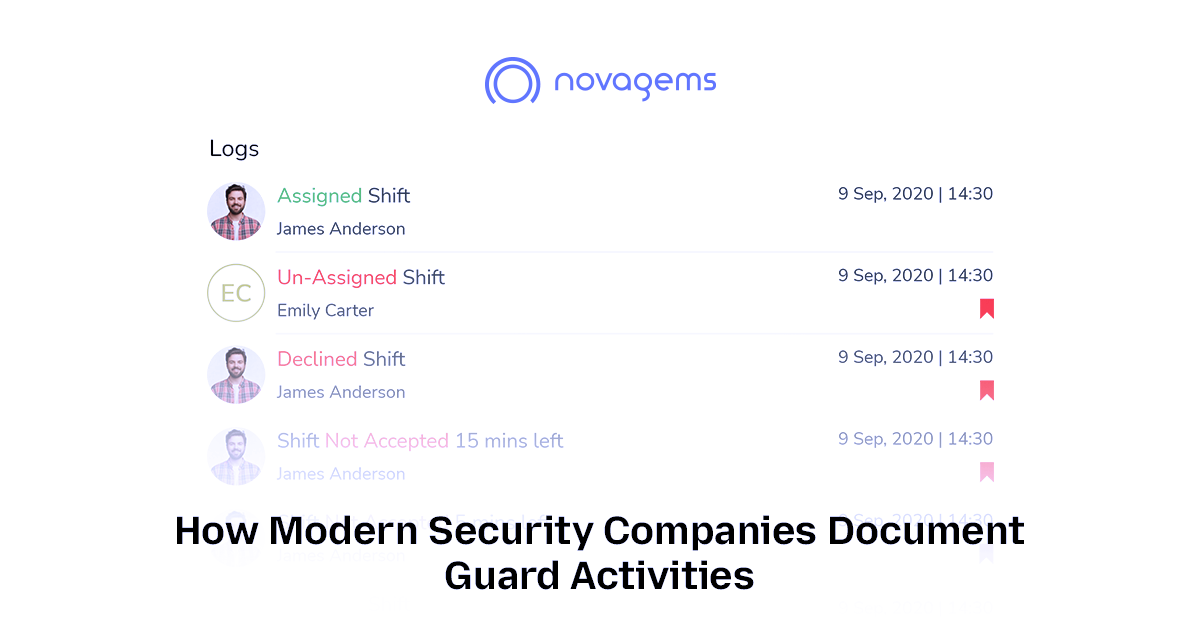
“Scheduling takes my whole Sunday." Drag-and-drop scheduling, shift templates, and automated notifications mean building a weekly schedule takes minutes instead of hours. Guards are notified immediately when a shift is assigned or changed. No more group texts, no more “I didn’t get the message” excuses.
“Clients keep asking for proof of patrol." Every checkpoint scan is timestamped and GPS-verified. Novagems generates patrol reports automatically — you can send them to clients on a schedule or give clients direct portal access. The question “was my site covered last night?” becomes one you answer with a link, not a phone call.
“My guards won’t adopt the software." Novagems is built for field use. Guards with smartphones — Android or iPhone — are up and running in under 10 minutes. The mobile app is designed to be used with one hand and doesn’t require a training course.
“I can’t afford enterprise software." Novagems pricing is transparent and designed for growing security companies — not enterprise contracts with six-month sales cycles. You can start a free trial today and have your first shift scheduled before the end of the week.
One customer running a 1,500+ guard operation put it simply: “Managing 1,500+ Guards Was Overwhelming — Now, Scheduling Takes Minutes, Not Hours."
Frequently Asked Questions
What is security guard management software?
Security guard management software is a platform that helps security companies manage their operations — including guard scheduling, real-time GPS tracking, patrol checkpoints, incident reporting, digital timesheets, and client communication. It replaces manual processes like spreadsheets and paper timesheets with a connected system accessible by both managers and guards through a mobile app.
How much does security guard management software cost?
Pricing varies widely by platform and company size. Per-guard pricing typically ranges from $3 to $12 per guard per month, while some platforms offer flat monthly fees starting around $29–99/month for smaller teams. Enterprise platforms often require custom quotes. Look for platforms with transparent pricing listed on their website — if you have to call to get a number, budget extra time for the sales process.
Can small security companies (under 25 guards) afford this software?
Yes. Several platforms are specifically priced for small teams, and the ROI kicks in quickly. If automated scheduling saves you 15 hours per week, and your time is worth $25/hour, that’s $375/week — or $1,500/month — in recovered time. A platform that costs $50–100/month is an obvious investment. The real question isn’t whether you can afford it — it’s whether you can afford not to have it.
What’s the difference between security guard management software and regular scheduling software?
General scheduling tools manage when people work. Security guard management software manages how guards work — which checkpoints they cover, whether they’re physically present, what incidents they report, and whether clients can verify coverage. The security-specific features (checkpoint tours, GPS patrol verification, incident reporting with photo evidence, post orders) don’t exist in generic scheduling apps.
How long does it take to set up security guard management software?
Most platforms designed for small to mid-size security companies can be set up in one to two days. You’ll need to add your guards, create your client sites, and build your first schedule. Novagems is designed for operations managers to set up without IT help, and onboarding support is included. Enterprise platforms with complex integrations may take weeks or months.
Do guards need to be tech-savvy to use the mobile app?
No. The best security apps are designed for minimal friction — scan a QR code, tap to clock in, tap to report an incident. Guards who’ve never used workforce software pick it up within a shift or two. If a platform requires a training session before a guard can clock in, that’s a design problem, not a guard problem. Check mobile app store ratings before choosing a platform — they’re a direct measure of real-world usability.
The Right Software Wins — and Keeps — Contracts
Running a security company without the right management software is like running a patrol without a radio — you’re always one step behind. Every coverage gap, every missed checkpoint, every disputed timesheet is a problem that dedicated software solves before it becomes a client complaint.
Security guard management software gives you real-time visibility into every guard on every site, cuts scheduling time from hours to minutes, and gives clients the proof of service they need to renew contracts. The market is growing because security companies that make this investment win — and keep — more business.
The right software doesn’t just save time. It’s how security companies win and keep contracts.
If you’re managing more than five guards and still relying on spreadsheets and group texts, the upgrade is overdue.
See Novagems in action
Join 1,000+ security & cleaning companies that replaced spreadsheets with Novagems.
✓ 14-day free trial · ✓ No credit card · ✓ Free onboarding