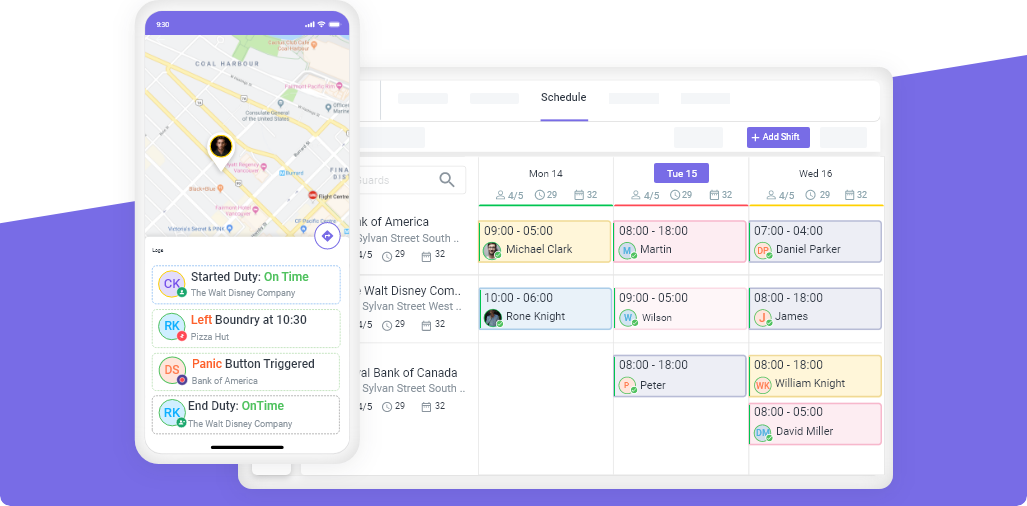
The security industry is changing fast. Clients expect transparency, guards need better tools, and companies are under pressure to prove their teams are exactly where they should be, on time, every time. Geofencing has quickly become one of the most reliable ways to achieve this.
For security companies across the U.S. and Canada, geofencing bridges the gap between what clients expect and what traditional supervision can realistically deliver. With the help of a tracking system, tracking app, and modern security guard tracking software, managers finally get real-time visibility. And guards get the tools they need to do their jobs more confidently.
This guide breaks down geofencing in a simple, practical way. What it is, why it matters, and how it strengthens guard tour tracking and GPS tracking for security guards.
Key Takeaways
- Geofencing creates virtual boundaries that automatically track and confirm when guards enter or exit assigned locations.
- GPS tracking and geofencing support different needs, one shows movement, the other enforces presence and timing.
- Modern security companies rely on geofencing for security guards to improve accountability, reduce no-shows, validate patrols, and keep guards safer.
- Real-time location monitoring removes guesswork, reduces paperwork, and strengthens client trust.
- Common challenges like GPS accuracy, battery drain, and privacy concerns are easy to manage with the right tracking app.
- When paired with security guard tracking software or a guard tour tracking system, geofencing becomes one of the most valuable tools in daily operations.
What is Geofencing in Security Guard Operations?
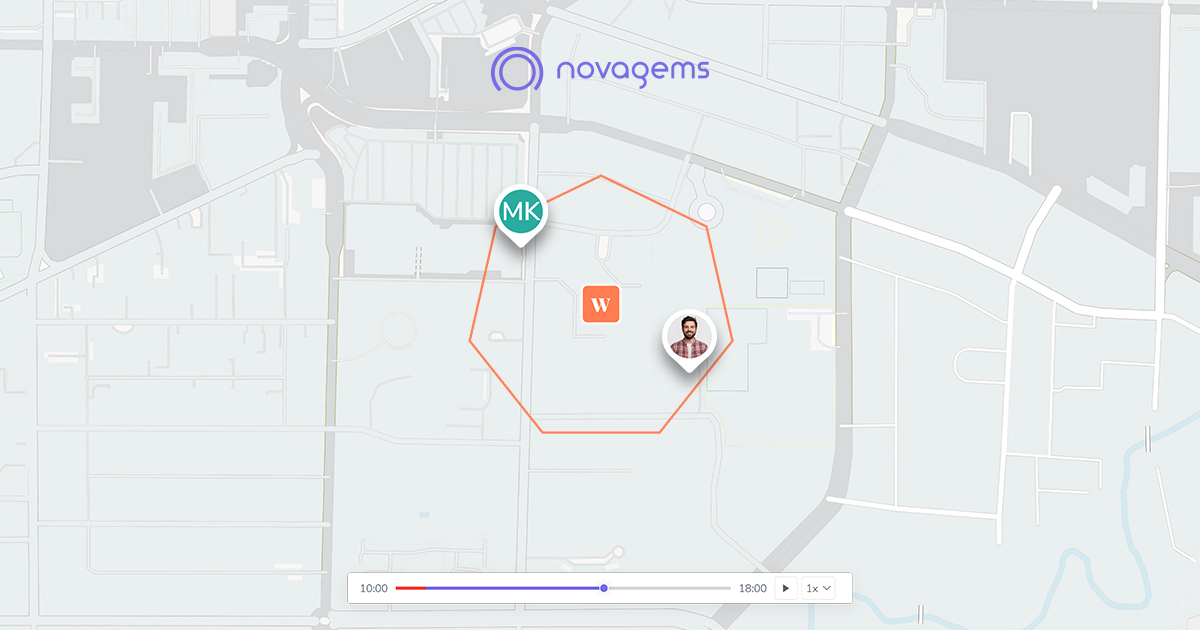
Think of geofencing as drawing an invisible line around a client site. Once that line is in place, the tracking system watches for guard movement in and out of that zone. And logs everything automatically.
Here’s what that means for real-world operations:
- You know exactly when a guard arrives on-site.
- You get notified if they leave earlier than expected.
- Patrol routes are more easily verified.
- Attendance automatically happens instead of having to check in manually.
- Supervisors catch issues like no-shows before they spiral into client complaints.
In short, geofencing does the background work that used to take several phone calls, manual reports, and a lot of trust.
How Geofences Work in Real-time Monitoring
At its core, geofencing for security guards works because your guard’s phone or device regularly sends location signals to your tracking app.
Here’s the simple version:
- A supervisor sets a virtual boundary around a site.
- GPS, Wi-Fi, or cell networks refresh the location on the guard’s device.
- If the device crosses that boundary, the system instantly logs the event.
- Managers view this activity real-time and receive notifications when necessary.
- All entries and exits are saved automatically for reporting, billing, and compliance.
Once set up, this process is hands-off. Guards don’t have to do anything, and supervisors get reliable data without chasing anyone for updates.
GPS vs. Geofencing: What’s the Difference?
GPS tracking and geofencing often get grouped together, but they solve different problems in security operations.
GPS tracking is about visibility. It tells you where a guard is at any given moment. This is useful for patrol oversight, route tracking, dispatching, and general supervision.
Geofencing, on the other hand, is about confirmation and control. It verifies whether a guard entered or exited a required area at the right time — something GPS alone doesn’t enforce.
Here’s the difference, clearly broken down:
- GPS tracking gives visibility to the movement of guards throughout their shift.
- Geofencing provides alerts based on location-based rules tied to virtual boundaries.
- GPS means real-time location tracking with exact positions.
- Geofencing is about enforcing presence, validating patrols, and ensuring guards stay within required zones.
- GPS supports supervision and route visibility.
- Geofencing supports compliance, timing validation, and automation.
- GPS shows movement. Geofencing triggers actions based on specific site boundaries.
Together, they offer complete accountability and operational control. Security companies that combine both get a much clearer and more accurate picture of guard activity, without depending on manual reporting.
Why Geofencing Matters for Modern Security Companies
Clients want one thing above all else: confidence that the guards they’re paying for are doing the work as promised. Geofencing helps deliver that confidence, without extra labor or micromanagement.
Here’s why it has become necessary:
- It boosts accountability. Guards can’t “forget” to check in, the system does it for them.
- It strengthens patrol oversight. Missed patrols or skipped areas are caught instantly.
- It reduces no-shows. If a guard doesn’t arrive on time, supervisors get alerted right away.
- It improves safety. If a guard leaves a safe zone unexpectedly, managers know immediately.
- It builds trust with clients. Transparent proof-of-presence reduces disputes and keeps renewals strong.
- It cuts administrative time. Automated logs mean less paperwork and fewer follow-up calls.
Geofencing delivers consistency. Something every security company depends on to keep contracts and maintain service quality.
How Real-Time Location Tracking Works
Real-time location monitoring isn’t complicated once you see how it fits together. It’s GPS tracking, geofencing, and alerts working hand-in-hand.
Here’s the flow:
- Guards use a tracking app or work device.
- Its device updates its location automatically.
- Events are recorded whenever they enter or leave a geofenced zone.
- Managers view activity live in a dashboard.
- Alerts notify supervisors of delays, unusual routes, or missed checkpoints.
- Reports and logs are produced, with nobody having to write a single note.
- For guard tour tracking, this means fewer questions, fewer disputes, and fewer surprises.
Key Benefits of Geofencing to Security Guards and Managers
Geofencing adds value to all stakeholders: guards, supervisors, and clients.
Operational Benefits:
- Precise proof of presence removes disputes and gives clients trusted verification.
- Automated time and attendance ensure guards clock in and out based on geofence entry and exit.
- No more manual timesheets for supervisors or check-ins.
- Geofencing forces mobile patrol guards to follow designated paths, hence improving patrol accuracy.
- Alerts will immediately notify them of any missed checkpoints or areas.
- Guard safety improves with alerts triggered if guards leave safe areas unexpectedly.
- Faster responses to emergencies or unusual activity can occur.
- Administrative work decreases with automated reports for payroll, audits, and compliance.
- Processes that are digitized result in less paperwork and fewer manual errors.
Benefits for Guards:
- Reduced misunderstandings because it automates attendance and patrol tracking.
- More trust from supervisors due to transparent and accurate recorded performance.
- Improved safety due to monitoring and, when required, immediate assistance.
Benefits for Consumers:
- Higher quality service backed by verified patrol logs and presence tracking.
- Long-term trust comes with greater transparency.
- Stronger justification of contracts because of reliable documentation.
When all three groups benefit, retention improves, complaints decrease, and operations run more smoothly.
Common Challenges with Geofencing - How to Avoid Them
Like any technology, geofencing for security guards isn’t perfect. But most challenges are easy to manage when understood upfront.
Here are the real-world challenges security companies face, and how to avoid them:
- Tall buildings, being underground, or weak signals can affect GPS accuracy.
- Choosing software that uses hybrid methods like GPS + Wi-Fi + cellular improves accuracy.
- The location services used on mobile devices increase the battery consumption thereof.
- Use tracking apps optimized for low power. Provide guards with portable chargers.
- Privacy concerns may arise among guards unfamiliar with the system.
- Explain clearly that tracking works only during shifts and protects their safety and payroll accuracy.
- Companies are also scared of overdependence on technologies of verification.
- Proper training, guidelines, and periodic testing ensure the system supports operations without replacing supervision.
Done properly, geofencing becomes something credible to the worker instead of a point of resistance.
Final Thoughts
Geofencing has moved from being a “nice extra feature” to one of the most valuable tools a security company can adopt. It improves accountability, boosts safety, strengthens client trust, and reduces the manual workload that slows teams down.
When paired with a reliable tracking system, tracking app, or full security guard tracking software, geofencing gives companies more control over operations and far better visibility into what’s happening on the ground.
It’s efficient. It’s accurate. And it’s becoming the new standard in guard tour tracking and GPS tracking for security guards.
Curious to See How Geofencing Works in Action?
If you’re ready to reduce no-shows, improve patrol accuracy, and give your team the support they need, now is the time to explore geofencing. Novagems brings together everything you need — geofencing, GPS tracking, attendance automation, incident reporting, and guard tour tracking, all in one place. See how it works. See how it feels. See what it changes.
Book a free demo and experience how geofencing is changing security operations today.
See Novagems in action
Join 500+ security & cleaning companies that replaced spreadsheets with Novagems.
✓ 14-day free trial · ✓ Free onboarding · ✓ Cancel anytime