How to Manage Security Guards Across Multiple Sites
Mon, Dec 1, 2025
Read in 13 minutes
Learn how to manage security guards across multiple sites with streamlined and centralized solutions and practices. Your multi-site security guard management just got easy.
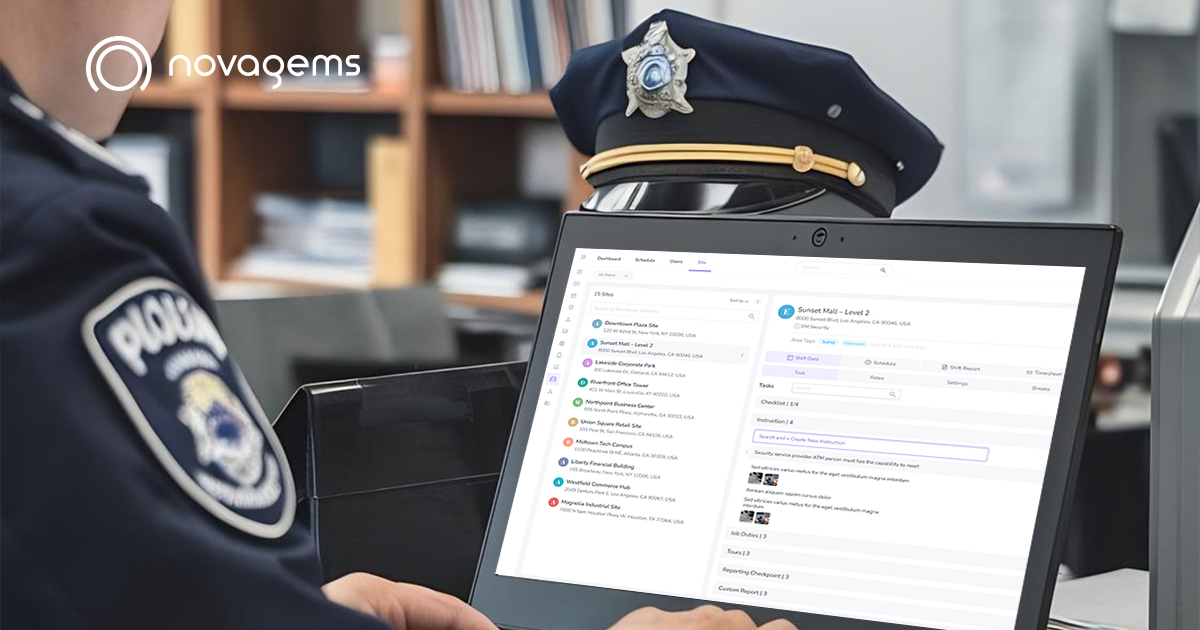
Managing security guards across multiple sites shouldn’t feel like juggling flaming torches while blindfolded. Yet for many security companies, that’s exactly what it feels like—chaotic, stressful, and one missed shift away from disaster.
The good news? It’s manageable, even surprisingly efficient, with the right approach and modern security guard management software. From standardization of schedules to leveraging GPS tracking, we will walk you through exactly how to manage security guards across multiple sites in this guide.
Key Takeaways
- The guard scheduling software prevents double bookings and last-minute coverage gaps.
- Accountability improved 65% with GPS tracking. Real-time location verification places guards where they should be.
- Guards file incident reports with a photo and a timestamp instantly
- Automation of alerts prevents 85% of missed shifts. Proactive notifications catch problems before they become emergencies.
- Standardized procedures improve consistency. Each location will get predictable, professional service, regardless of which guard is on duty
- Real-time dashboards provide real-time visibility. View the status of all sites, guards, and incidents from one screen.
Common Issues Faced by Security Companies in Multi-Site Operations
The Scheduling Nightmare
You are trying to schedule fifteen sites with forty guards who all have different availability, certification, and preferences. Guard A is not available for Sunday shifts. Guard B is licensed only for the unarmed posts. Guard C just called in sick. You have to fill in a replacement in thirty minutes.
Scheduling manually with spreadsheets becomes impossible to manage at scale. One manager we spoke with spent twelve hours every week just creating schedules. When schedules are managed manually, errors are inevitable:
- Double-bookings occur with regularity.
- Guards get dispatched to the wrong sites
- Coverage gaps surface when it is too late to rectify them.
- Last-minute changes create chaos.
The Black Hole of Accountability
How do you really know your guard showed up on time? Are they really walking the property, or are they in their car? You are basically operating with self-reported data, without GPS tracking and digital verification.
Indeed, it follows that companies using GPS tracking find that approximately 15-20% of claimed hours don’t match up with actual on-site presence. Those missing hours add up to thousands of dollars in overpayment and service gaps your clients notice.
The Communication Breakdown
Critical information gets lost when communication is relayed via phone calls, text messages, and verbal handoffs between shifts.
- Incident reports sit in a guard’s car for three days
- Important updates regarding the access code never reach the evening shift.
- Site-specific instructions are in only one supervisor’s head
- Client notifications get late or forgotten.
Credential Chaos
License management, certification management, and training records-these all become a minefield of compliance for fifty guards.
- Guard Williams’ armed license is set to expire next Tuesday, a fact nobody caught.
- Training completed by Guard Chen, but the certificate is in a file cabinet somewhere
- One missed certification can mean losing a client or incurring a penalty.
The Inconsistency Problem
That means, without standardized procedures, service quality runs the gamut: Site A has guards who submit detailed reports with photos. Site B has guards who scribble two sentences. Site C’s guards don’t submit reports at all. The inconsistencies do not go unnoticed by your clients, and such reflects badly on the whole operation.
How to manage security guards across multi-site operations
Step 1: Standardize Scheduling & Shift Assignments
Build a Centralized Scheduling System
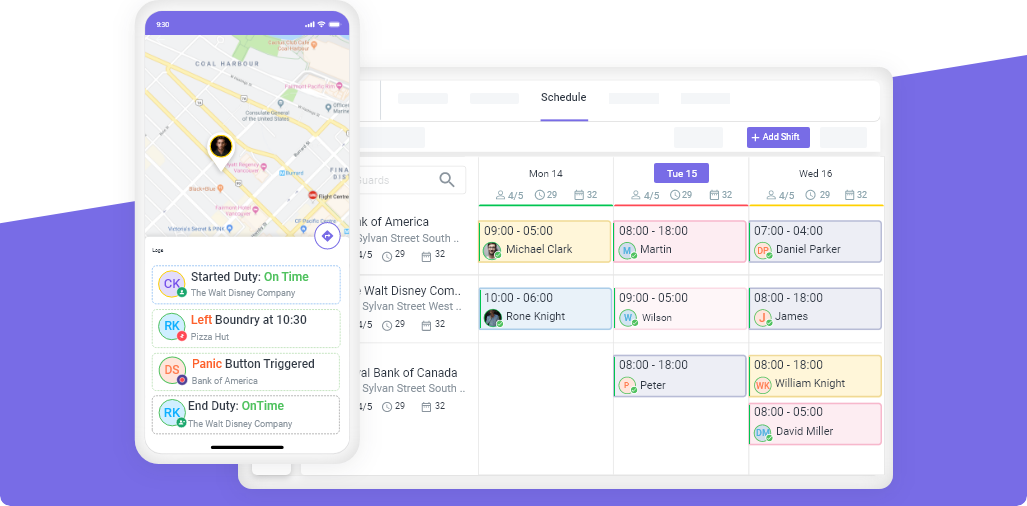
Stop using separate spreadsheets for each site. Employ guard scheduling software that provides you with a single view of all sites, all guards, and all shifts.
With modern multi-site security guard management software, you are able to:
- See at a glance which sites are fully staffed and where the gaps are
- Create shifts and assign guards from anywhere.
- Automatically send notifications on schedule changes
- Phone tag and communication confusion can be avoided.
Create Site-Specific Shift Templates
Most sites have predictable scheduling needs. The office building needs coverage Monday through Friday, 6 PM to 6 AM. The retail store needs guards during business hours seven days a week.
The templates save enormous time and reduce errors.
- Work from proven templates. Rather than sitting and recreating new schedules every week.
- Get an overview and spot patterns, like which sites need more weekend coverage
- Make changes without rewriting from scratch.
Match Guards to Sites Based on Skill
Not every guard can work at every location. Good scheduling software tracks each guard’s certifications, training, and preferences, then helps you make smart assignments. It warns you when you’re about to assign a guard to a site where they’re not properly certified.
Planning Schedules at Least One Week in Advance
Studies have shown that posting schedules at least a week in advance reduces call-offs by nearly 40%. Guards appreciate knowing their schedule ahead of time. It helps them plan their lives and commit to assigned shifts.
Step 2: Tracking of Guards through GPS Tracking Software
Trust is important, but verification is the name of the game. It’s not about micromanaging; rather, GPS tracking provides actual data for accountability, safety, and client reporting.
Implement Real-Time Location Verification
It captures GPS coordinates at the time of clocking in of guards, confirming whether they are really at an assigned site. Every action performed in patrols is timestamped and location-verified.
GPS tracking is among the benefits.
- See which guards are on patrol now, and where
- Know immediately if Guard Martinez is supposed to be at the warehouse but is five miles away
- Provide clients with GPS-verified proof of service
- Eliminate disputes in attendance or hours worked
Set Up Geofencing for Automatic Verification
Geofencing creates virtual barriers around each location. Guards can only clock in when physically within the geofenced area: that means they cannot clock in from home or the parking lot down the street.
Analyze Performance using GPS Data
- GPS tracking ensures much more than attendance data.
- Provide analysis for patrol patterns to ensure complete property coverage.
- Measure response times between locations
- Identify patrol route inefficiencies
- Answer client questions with GPS-verified proof
Step 3: Digitalize Incident & Activity Reporting
Paper reports are where information goes to die. Digital reporting ensures incidents are documented immediately, shared instantly, and forever accessible.
Enable Mobile Reporting from the Field
Security guard management software allows guards to submit reports directly from their smartphones while the incidents are fresh. They can:
- Create incident reports in great detail with ease.
- Add photos or videos as evidence.
- Record voice notes if it’s hard to type.
- Make direct submissions to all supervisors and clients
This eliminates the workflow of guards writing down on paper, transferring them to formal reports much later (if at all), submitting that report when they get around to it, and someone actually reads it (if at all).
Standardize Formats of Reports
Digital reporting systems have templates that ensure each report contains all the data a reader could need:
- Date, time, and GPS location
- People involved
- Elaborate description
- Photos and video evidence
- Automate routing to the right stakeholder(s).
Create Searchable Incident Database
All digital reports will create a valuable database of historical incidents. Need to know how many vehicle break-ins happened at Site D last quarter? Search the database. Client asks about a vandalism incident from three months ago? Pull up the full report with photos in seconds.
Step 4: Mobile Patrol Tours Setup for High-Risk Sites
Basic presence will not work for high-value sites. There, you need proof that guards are out patrolling the designated areas and doing so on schedule.
Deploy the Checkpoint Systems
Place checklist systems make use of QR codes, NFC tags, or GPS waypoints throughout a property. Guards are required to physically stop at each checkmark and scan them in during patrols, creating verifiable proof that they have been on the full route.
Example: For a manufacturing facility that has ten checkpoints covering the perimeter and sensitive areas, guards are required to scan all ten on each patrol. Failed checkpoints trigger immediate supervisor alerts.
Create Patrol Schedules with Required Frequencies
Different sites require different patrol frequencies.
- Construction sites: Checks around perimeter every 2 hours
- Corporate campuses: Hourly checks of the interiors of buildings
- Retail locations: Floor walks every 30 minutes
Set up your system to identify these needs. So that tracking is confirmed by default.
Generate Proof of Service for Clients
Patrol data becomes powerful proof of service. Reports can be generated showing:
- Exactly when guards completed each patrol
- Which checkpoints visited
- How long each patrol took
- Full route verification by GPS
This is concrete evidence that conveys this value much better than just a statement like “we provide security services.”
Step 5: Monitor Performance with Dashboards & Analytics
You can’t manage what you can’t measure. Real-time dashboards turn raw data into actionable insights.
Creating Real-Time Operations Dashboard
Your dashboard should show at a glance:
- How many guards does it have on duty currently?
- Which are staffed versus unmanned sites
- Any active incidents or alerts
- Upcoming shift changes
- Guards are late or fail to clock in
This becomes your command center. Instead of making calls to figure out what’s happening, you see everything immediately.
Track Key Performance Metrics
Observe these indicators for all locations:
- On-time performance: the percentage of shifts starting on time
- Patrol completion rate: How often guards actually complete the patrols they are supposed to do
- Incident response times: How fast guards react to alerts
- Report submission rates: Whether guards document activities properly
- Client satisfaction scores: Feedback consolidated across all sites
Analytics to Improve Operations
Analytics help you find trends and opportunities.
Site B has an existing need for every Thursday evening coverage gap → More Thursday guards are needed.
Some guards are better-suited for certain types of sites → Optimally assign guards to sites
Inefficiency in patrol routes; better optimization of patrol routes would yield much better coverage of areas.
Step 6 - Streamline Timesheets & Payroll Across Sites
Payroll in multi-site operations is complex. Guards work at various sites at different rates. One has to track hours precisely for correct pay and compliance.
Automate Time Tracking with GPS Verification
On-site, GPS-verified timesheets detail exactly when guards arrived and when they departed from a location, making it undisputed. Benefits include:
- No more lost or altered paper timesheets
- No disputes about hours worked
- Automated tracking of multisite rate variation
- Precise overtime calculations according to location rules
Export Clean Payroll Data
Export organized payroll information directly into your payroll system, including all worked hours, calculated rates, overtime, and deductions. Clean data means faster, more accurate payroll processing.
Best Practices for Managing Multiple Security Sites
Use Centralized Communication Channels
End managing communications through separate text messages and different threads of emails. Establish a centralized communication model in which:
- Crucial updates are provided in one accessible location
- Supervisors can make announcements to targeted groups
- Everything is recorded and can be searched
- Changing shifts and emergency messages go to all people in a split second
Record Guard Credentials, Licenses, and Qualifications Online
Establish a digital platform that:
- Tracks licenses, certifications, and training of each guard
- Establishes automatic notifications 30 days prior to when credentials expire
- Verifies if guards have the necessary certifications before assigning them to a site
- Automatically creates reports indicating all guards are meeting standards
Provide Site-Specific Training and SOPs
Every site is different, with its own set of characteristics and demands. Some of the site-specific training for guards includes:
- Access procedures and key holder information
- Emergency contacts and procedures
- Special patrol requirements
- Known Risks/Concerns
- Client-specific expectations
Establish and provide Standard Operating Procedures (SOPs) for each location through your management system.
Use Automated Alerts for Missed Shifts or Incomplete Patrols
Establish proactive notifications for:
- Guards who have not marked in within 15 minutes after their shifts have started
- Required patrols, which are overdue
- Guards who leave early when they are supposed to be
- Reports not lodged within a given time
- Credentials Expiring Soon
- Open shifts not yet filled
Such notifications allow you to step in before situations go out of control, thus reducing stress and firefighting.
How Novagems Makes Multi-Site Security Management Easier
Although these are good practices independent of tool usage, effective security guard management software can make all of this much simpler.
One Dashboard for all Sites and Guard Activity
Novagems offers a unified view of the following:
- Who are currently on guard
- Active incidents requiring attention
- Sites which require coverage
- Coming shifts and postings
- Current activity in all geographies
Whether you have five sites or fifty, you have complete control over them all with a single platform.
GPS-Verified Patrols & Geofenced Attendance
Novagems relies on GPS in smartphones to automatically check guard positions:
- Guards Clock in Only When Physically Present at Sites
- Every patrol checkpoint is GPS-verified and time-stamped
- View historical location information during shifts
- Receive notifications when guards leave their assigned sites
Scheduling for Multi-Site Teams
Make schedules quickly with:
- Shift templates for repeating work hours
- Assigning Guards Based on Certification and Availability
- Automatic notifications for schedule changes
- Visibility of coverage gap at all sites
- Drag-and-drop schedule modifications
Incident Reports with Photos, Videos, and Time Stamps
The reports include such information as
- Guards submit detailed reports directly from phones
- Photos of exactly what occurred
- Videos documenting events in real time
- Recording voice messages for security guards when they prefer voice to keyboard
- Automatic GPS location and timestamp information
Reports are immediately available to supervisors and distributed to clients automatically.
Real-Time Alerting for Supervisors
Receive automatic notifications for:
- Guards not punching in on time
- Due or incomplete patrols
- “Guards were recruited mainly from among
- Guards leaving geofenced regions
- Expiration of credentials
Client-Ready Reports That Build Trust
Providing automatically generated professional-level reports on:
- Working hours at each site
- Cases documented and closed
- Patrol conducted with GPS verification
- Photos of everyday events and occurrences
Set up your reports to be automatically sent to your clients every week or month. Or you can allow them to have access to their dashboard, where they can check information any time they want.
FAQs
How do you manage guards at multiple sites effectively?
Use a single platform handling scheduling, GPS tracking, incident reporting, and communications for all locations. This gives unified visibility instead of juggling separate systems. Most importantly, leverage technology to automate routine tasks like attendance verification so you can focus on strategic management rather than administrative firefighting.
What tools help track guard activity across locations?
GPS-enabled security guard management software like Novagems tracks activity across all locations from one dashboard. Key features include real-time GPS location tracking, geofenced clock-in/out systems, mobile patrol checkpoint scanning, digital incident reporting with photos, automated scheduling, and performance analytics.
How can software improve guard accountability?
Security guard management software improves accountability through automated verification. GPS tracking proves guards were physically at assigned sites. Checkpoint scanning verifies patrols were completed. Digital reporting creates permanent records with timestamps and photos. Geofencing prevents early clock-outs or remote check-ins.
How do multi-site companies prevent missed shifts?
Prevention requires proactive systems. Automated scheduling notifications remind guards of upcoming shifts well in advance. Automated alerts notify supervisors immediately when guards haven’t clocked in, allowing quick intervention. Guards confirm shift acceptance through the app. Tracking attendance patterns identifies unreliable guards before they cause problems.
Next Steps for Security Team Leaders
You now have a complete roadmap for managing security guards across multiple sites effectively. Start by evaluating your current systems honestly. Where are the biggest pain points? Is scheduling consuming too much time? Are you dealing with accountability issues? Do clients complain about inconsistent service?
Identify your top three challenges, then prioritize solving them. If you’re using manual methods or outdated systems, exploring modern security guard management software should be your first priority. Most companies report positive ROI within the first few months of implementation.
Don’t try to fix everything at once. Pick one area—maybe scheduling, GPS tracking, or incident reporting—and get that system working well before moving to the next. Small, consistent improvements compound into dramatically better operations.
Your guards and clients are waiting for you to implement these systems. Guards want clear schedules, fair assignments, and tools that make their jobs easier. Clients want consistent, professional service with transparent reporting.
Ready to see how Novagems can transform your multi-site security operations? Explore our features designed specifically for multi-site security guard management and discover why growing security companies choose Novagems to scale efficiently.
Sign up For Newsletter
Latest Blog Posts


Get Started
Start being productive & grow your business
with Novagems